


OK so I’m going to be really honest with you. I have tried basically every automated bookkeeping system available to Australian small business owners. QuickBooks, Xero, Hnry, Thriday. I’ve had subscriptions to all of them at some point. And they’re all fine! They genuinely are.
Thriday was actually my favourite. It was the closest to what I needed as an sole trader and the automatic categorisation was genuinely helpful and the reciept forwarding could be automated as well. But it was on the pricier side, and BAS and tax lodgement cost extra on top of the subscription, which started to add up.
Then, right as we were coming up to EOFY, the news dropped that Thriday was being acquired by Tyro. And honestly? It all seemed a bit hard to migrate everything and that was the moment I decided to stop relying on someone else’s platform entirely and build my own.
So I took the EOFY timing as an opportunity to start fresh. I sat down, looked at what I was actually paying for, and realised I already had every piece of the puzzle sitting in the tools I use every day. My Dubsado had the invoice info. My Stripe had the payment data. My Gmail had every receipt. The “accounting platform” was just pulling it all together into a nicer looking interface. And I was paying $30, $50, sometimes more per month for that interface.
Here’s what I built instead.
Wait, What Was Wrong With the Paid Options?
Nothing was catastrophically wrong with any of them. But they each had something that didn’t quite fit the way I work.
Here’s my honest take:
| Platform | What I liked | What didn’t work for me |
|---|---|---|
| QuickBooks | Very feature-rich, integrated with Dubsado for a minute there | Way more than I needed as a solo service provider. Overkill and pricey for what I actually use. Confusing and complicated interface |
| Xero | Clean UI, good for GST/BAS | Still felt like I was paying for features I didn’t need. Required regular manual input to actually be useful. The reciept forwarding was extremely clunky |
| Hnry | Handles tax witholding automatically, great for contractors | They intercept your income to withhold tax before it hits your account. I want full control of my cashflow and preferred to manage my own tax reserves. |
| Thriday ⭐ my fave | Smart automatic categorisation, very Australian, genuinely great for sole traders | On the pricier side, BAS and tax lodgement cost extra on top. And then the Tyro acquisition news landed right before EOFY, which was the final push I needed to build my own. |
| My DIY System | Fully customised, real-time, automated | Requires a paid Zapier plan + setup time upfront |
None of these are bad tools, and if what you’re already using is still working for you, there’s no reason to change. But the combination of cost, the add-on fees, and the uncertainty around the Tyro acquisition of Thriday made it the right time for me to do something different.
What I Actually Need From an Automated Bookkeeping System
As a service based business owner in Australia, my financial needs are pretty straightforward:
- Track what’s coming in (income + Stripe fees)
- Track what’s going out (expenses, categorised, with GST noted)
- Store receipts somewhere I can actually find them at tax time
- Know roughly what I owe the ATO at any given point
That’s it. I don’t have staff. I don’t hold inventory. I don’t need complex payroll or multi-currency reporting. And once I realised that, I also realised I already had every piece of the puzzle. I just needed to connect them.
The Tech Stack
- Invoicing & Payments: Dubsado + Stripe
- Command Centre: Google Sheets
- Filing Cabinet: Gmail + Google Drive
- Automation Engine: Zapier + Gemini AI
A note on costs:
This isn’t technically free, I want to be upfront about that. The Zaps I’ve built are multi-step, which means you do need a paid Zapier plan (starts around $29 AUD/month on the current pricing). Gemini AI access depends on your Google Workspace subscription. It’s included in some Business tiers but not all. That said, even with Zapier’s paid plan this still works out cheaper than most of the accounting platforms I was previously using, and I get a system that’s actually built around my business rather than a generic one-size-fits-all setup.
How the System Works
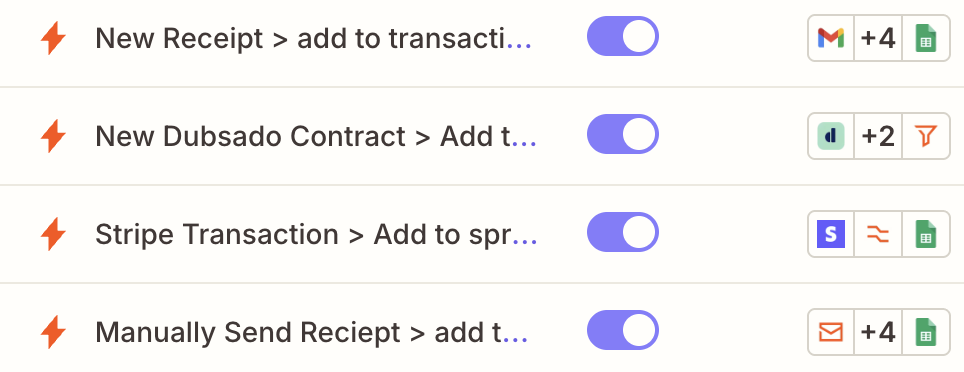
I have four Zaps running in the background doing all the heavy lifting. Here’s what each one does:
Zap 1: Income logging from Stripe
When a client pays a Dubsado invoice via Stripe, Zapier fires automatically. It logs a new row in my Google Sheets income tab with the date, client name, gross amount, Stripe processing fee, and net amount.
Every payment recorded the second it’s processed. No manual reconciling at the end of the month.
Zap 2: AI receipt extraction from Gmail
This is my favourite one. But before the Zap even does anything, Gmail is doing a bit of the groundwork. I have a Gmail filter set up so that any email containing the words “invoice” or “receipt” in the subject line automatically gets labelled as “Tax Invoices”. That label is what the Zap watches for, so it only triggers on the emails that are actually relevant. No noise, no accidental triggers.
Once an email hits that label, Zapier sends the email content to Gemini AI. Gemini reads the receipt and extracts the date, vendor name, total amount, GST amount and assigns an expense category (things like “Software & Subscriptions” or “Professional Development”).
That data gets dropped straight into my expenses tab. I genuinely never manually enter an expense anymore.
Zap 3: Auto-save receipts to Google Drive
At the same time as Zap 2 is extracting the data, Zap 3 is grabbing the PDF attachment from that same email and saving it into a “Tax Receipts” folder in Google Drive. Always audit ready, never have to think about it.
Zap 4: Accounts receivable from Dubsado
When a new project is created in Dubsado, key details get logged in an accounts receivable tab: invoice number, client name, project name, total, payment status. So I can see at a glance what’s outstanding vs what’s been paid.
The Dashboard
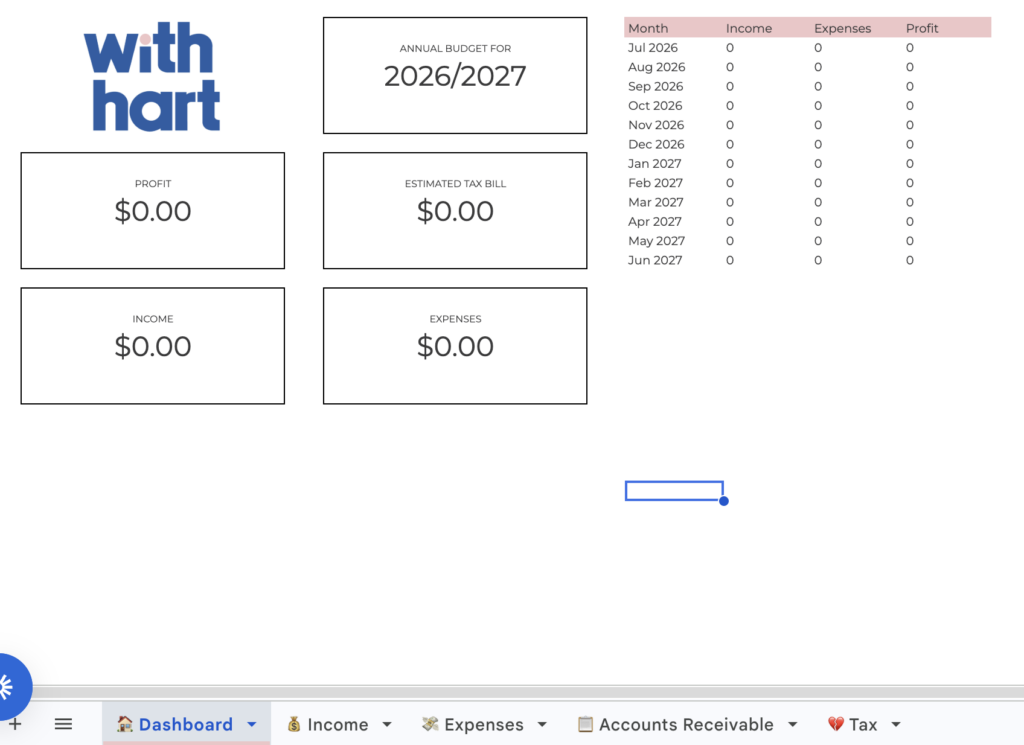
All four of those Zaps feed into the one Google Sheet, which has a dashboard tab that automatically updates to show:
- Total gross income
- Total expenses (broken down by category)
- Net profit
- Estimated income tax and Medicare levy (based on current Australian tax brackets)
- Low Income Tax Offset calculation
Opening my spreadsheet at any point in the year gives me a clear picture of my financial position and a rough estimate of what I’ll owe at tax time. No surprises in June. That alone is worth it.
What This Doesn’t Replace
I want to be really clear here: this automated bookkeeping system is not an accounting platform and it doesn’t replace an accountant. It doesn’t lodge anything with the ATO. It doesn’t manage BAS or handle complex deductions. What it does is give me clear, real-time visibility over my cash flow so I can make better decisions throughout the year.
If you have complex tax situations, employees, or you’re not confident managing your own records I would absolutely still recommend working with an accountant or bookkeeper. Please talk to a professional before making any changes to how you manage your business finances. What works for my setup might not suit yours.
So Is It Worth Building?
If you’re already paying $40+ a month for an accounting platform and you’re using maybe 20% of its features, then yes I reckon building your own automated bookkeeping system is worth exploring. The upfront setup time is real (I’m not going to pretend it’s a five-minute job), but once it’s running it’s genuinely hands-off.
PSA: I’m sharing everything for free.
If you want to build this yourself, I’m more than happy to share the Zap links, the Google Sheets dashboard template, and the folder structure I use. No catch, no opt-in, just the actual stuff. If this system saves even one other small business owner the subscription fatigue I went through, that’s good enough for me.
Get in touch and I’ll send it all over
Before making any changes to how you manage your business finances, I’d always recommend having a chat with your accountant or bookkeeper first, especially around GST obligations and record keeping requirements.
FAQ
Do I need a paid Zapier plan to build this? Yes. Because the Zaps involved are multi-step (they connect more than two apps), you’ll need at least Zapier’s Starter plan. At the time of writing that’s around $29 AUD/month.
Is Gemini AI free? It depends on your Google Workspace plan. Some Business tiers include Gemini, others require an add-on. Worth checking your current subscription before you start building.
Can I use a different CRM instead of Dubsado? Absolutely. If your CRM connects to Zapier and you process payments through Stripe, the setup would work in pretty much the same way. HoneyBook users, for example, could adapt this without too much trouble.
Does this replace an accountant? No. This is a visibility tool, not a lodgement or compliance tool. Think of it as a really good dashboard rather than a replacement for professional financial advice.
What if a receipt doesn’t come through email? I actually have a Zap set up for this too! If I get a physical receipt or something that doesn’t land in Gmail automatically, I just forward or email it to a dedicated Zapier email address and it gets processed exactly the same way as the automated Zap would handle it. So it’s still manual in the sense that I have to send the email, but the extraction and logging all happens automatically from there.


Packed with links and resources as well as detailed step-by-step instructions, you can begin creating a more professional customer experience in no time.
Pop your email below, and I’ll personally deliver it straight to your inbox!


